Posts

Pixels: Tag brush

Image
  For this Pixels assignment, it was my first time using Adobe Photoshop. Specifically, I worked on creating a "logo" that could be included in all of my upcoming works. The first image above is the previous logo I did, that encapsulates my identity. It represents who I am, Polish, and my zodiac sign, Cancer. It was important to create a logo that could be put on my future works, as it gave them meaning and identity linked to me. To create the colorful logo above, I added some effects such as scratches, and smudge to the original black and white logo. Then I created a brush print, that I could stamp in whatever way I saw fit. I selected those four colors as I felt they really popped out and made a statement. 
Pixels: Photoshop Homework #1

1. https://www.youtube.com/watch?v=pFyOznL9UvA      The first tutorial on adobe photoshop that I looked at is called "Adobe Photoshop Tutorial : The Basics for Beginners". This 37 minute video is not too short, but not too long. I like this video as it thoroughly covers the basics of adobe photoshop. Even though it only covers the basics for beginners, the explanation is very detailed and easy to understand. The video is divided into 5 main sections: Interface, Effects panel, Working with images, Working with text, and Essential tools. By dividing these skills into sections in time stamps, it helps you easily access the section you need most help with or work on. I also liked the last section as it showed you how to use simple tools such as eraser, pen, pencil, the visibility icon, etc.  2. https://www.youtube.com/watch?v=IyR_uYsRdPs      I really like to save the tutorials that are quite long, as I know they are going to be thorough in their...

Self Portrait Propaganda Poster

Image
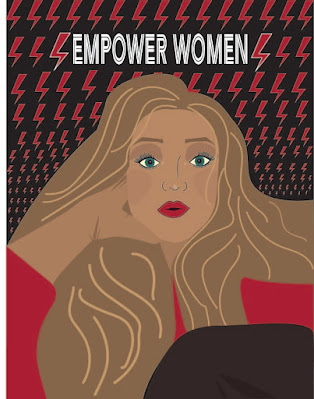
  For my Self Portrait Propaganda Poster project, I wanted to share my inspiration from the Polish women's movement against the Polish government. This movement symbolized by the red lighting bolt, focuses on empowering women, and their deserved rights. Specifically, this polish movement fights against the Polish government's anti-abortion law. I was inspired by the symbol of this movement, the red lighting bolt, as its red powerful imagery helps convey what the movement strives for. Similar to this movement's theme, I inserted the red lightning bolts in decreasing size in the background of the portrait. In the top center in bold white letters, it says "Empower Women"! To get this message across, I chose the font color to be white, so that it can pop against the dark background, catching the viewers' attention. In addition, I made the lips and the sweater bright red, to connect to this bold and empowering movement.                   ...

Vectors: Logo

Image
Above are the 4 versions of logos I created! For this project, I wanted to create something that would represent who I am. My identity, and where I call home, are the two most important things to me. Thats why I wanted to incorporate my "Cancer" zodiac sign symbol, and other symbols that represent Poland and specifically Warsaw, where I am from. To create the logo, I first started by using the line segment shape tool to create the "P" and bottom half "W". I used the curvature tool to alter the letter to my liking. Next, I used the pencil tool, to draw out the mermaid tail on each side of the symbol. In the middle of the "P" I used the paint tool to draw my cancer zodiac sign symbol. After creating each of the shapes, I selected them, and used the shape builder tool to merge them into one solid shape. For the color versions of my logo, I wanted to use colors that compliment each other the most, so that they might be visually appealing.  This above...

Vectors: Calligram Project

Image
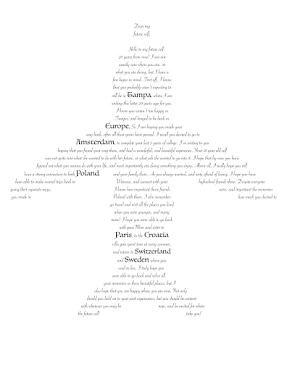
  For my both Calligram image and text, I was inspired by travel. The image is an airplane, and inside the airplane, are lines from a letter I wrote to my future self, 20 years from now. The letter discusses the importance of the places in my past, and also those that I hope will be part of my future. I bolded and changed the font style and size of these places, to emphasize their importance me now, and hopefully in the future. To create this Calligram plane, I simply merged four shapes together. I first created the body of the plane using the Ellipse tool, and altered it shape using the Curvature tool. I then used the Pencil tool to create the two wings, and the bottom portion of the plane. Then, I selected all of the shapes using the shift key, and clicked the Merge tool using the dotting grey tool. Next, I had to select the Text box, and pasted in my letter to my future self. Then, I selected the plane, and the text, and went to object Envelope Distory - Make with Top Object. Ne...

Vectors: Illustrator Tools

 1. Video #1 https://www.youtube.com/watch?v=3GzumUieDPY I found this video by "Flow Studio" very helpful, as it went through several of the tools in detail, and showed how to use them. The tools he used would be very helpful in creating any basic image through the use of standard shapes. I found the first couple of tools, the rectangle, and the star seemed easy to use. But the pental tool seemed a bit trickier. Also, the video tutorial seemed to go through only the most simple shape tools, and I feel as from watching this video alone, I wouldn't necessarily have knowledge of how everything on illustrator works. 2. Video #2 https://www.youtube.com/watch?v=To04focu36c Now this video by "Digital Art Creation", is very long, over an hour. But after watching part of it, and skimming to the rest, it covers are a decent amount of tools that Illustrator has. Not only did it go through the shape tools, but it also showed how to add gradients to them, etc. The man also w...

FMX 210-11 Canvas Project: Anya Kaplan

Image
  For my FMX 210, fall 2021 canvas project, I created a setting from the show  Spongebob , using Dreamweaver program with html code. In the image above, you see  my final creation, containing various shapes. The variety of circles, rectangles, squares, arrows, arcs, Bezier curves, and swoosh quadratic curves are set on a gradient background. Below, you can see the sketch and the original image that inspired me to create mine. I decided to code a sponge bob show setting, as I have always loved watching sponge bob when I was younger. The image also seemed very fun to replicate, as it was full of many bright colors and shapes that I felt could be interesting to transform into code. This was my first time using Dreamweaver, and manipulating code in general. The beginning of the process was quite challenging as it was basically a trial and error process. But once I got the hang of it, it was exciting to create shapes from nothing!  I started off my project by br...